

Does Cloudflare offer email hosting?
Not in the usual sense. Cloudflare has two email products, and neither is a mailbox. Email Routing receives mail for your domain and forwards it to an address you already have, like a Gmail account. Email Sending sends mail from your domain through an API or SMTP. There's no inbox to read, no sent folder, and no screen where you reply as you@yourproject.com.
That's the gap Digismak fills. It uses both Cloudflare products in your own account and puts the inbox on top.
| Email Routing | Email Sending | Digismak | |
|---|---|---|---|
| Receives mail for your domain | Yes, forwards it | No | Yes, into an inbox |
| An inbox to read and search | No | No | Yes, in any browser |
| Reply as you@yourproject.com | No | Through its API or SMTP | Yes, from an inbox |
| Shared addresses like support@ | Forward only | No | Yes, free, and a cofounder can answer too |
| Several domains | Rules per domain | Per domain | An inbox per domain, one login |
| Price | Free | Workers Paid, $5/month | $5/month to Cloudflare, Digismak free in early access |
What Cloudflare Email Routing does, and where it stops
Email Routing is free and works well for what it is. You point your domain's MX records at Cloudflare, add rules like "hello@ goes to my Gmail", and mail arrives in the inbox you already use. Each domain can have up to 200 routing rules, and each account up to 200 verified destination addresses.
The trouble starts when you reply. The reply goes out from your personal Gmail address, not from hello@yourproject.com, so the person who wrote in sees two addresses and the conversation splits. Making Gmail send as your domain means wiring up an outgoing mail server yourself, once per domain. With three side projects, mail for all of them lands in one personal inbox. And once a cofounder or a contractor helps with support@, forwarded copies land in separate inboxes with no way to see who already replied.
If you just want mail for one domain to land in Gmail, Email Routing on its own is enough. Digismak is for when you want to reply from your domain, keep each project’s mail in its own inbox, or share an address with someone.
How Digismak adds the inbox and sending
Setup installs a small relay Worker in your Cloudflare account and points Email Routing at it. Incoming mail goes from Cloudflare to your Digismak inbox. When you reply, Digismak sends through Cloudflare Email Sending on your account, signed for your domain.
 Your Cloudflare account
 Digismak
Your inbox, in any browser
Digismak
Your inbox, in any browser
Everything runs in your account with a token you create and can delete at any time. Your existing Email Routing rules keep working: Digismak only takes the addresses that no rule already covers.
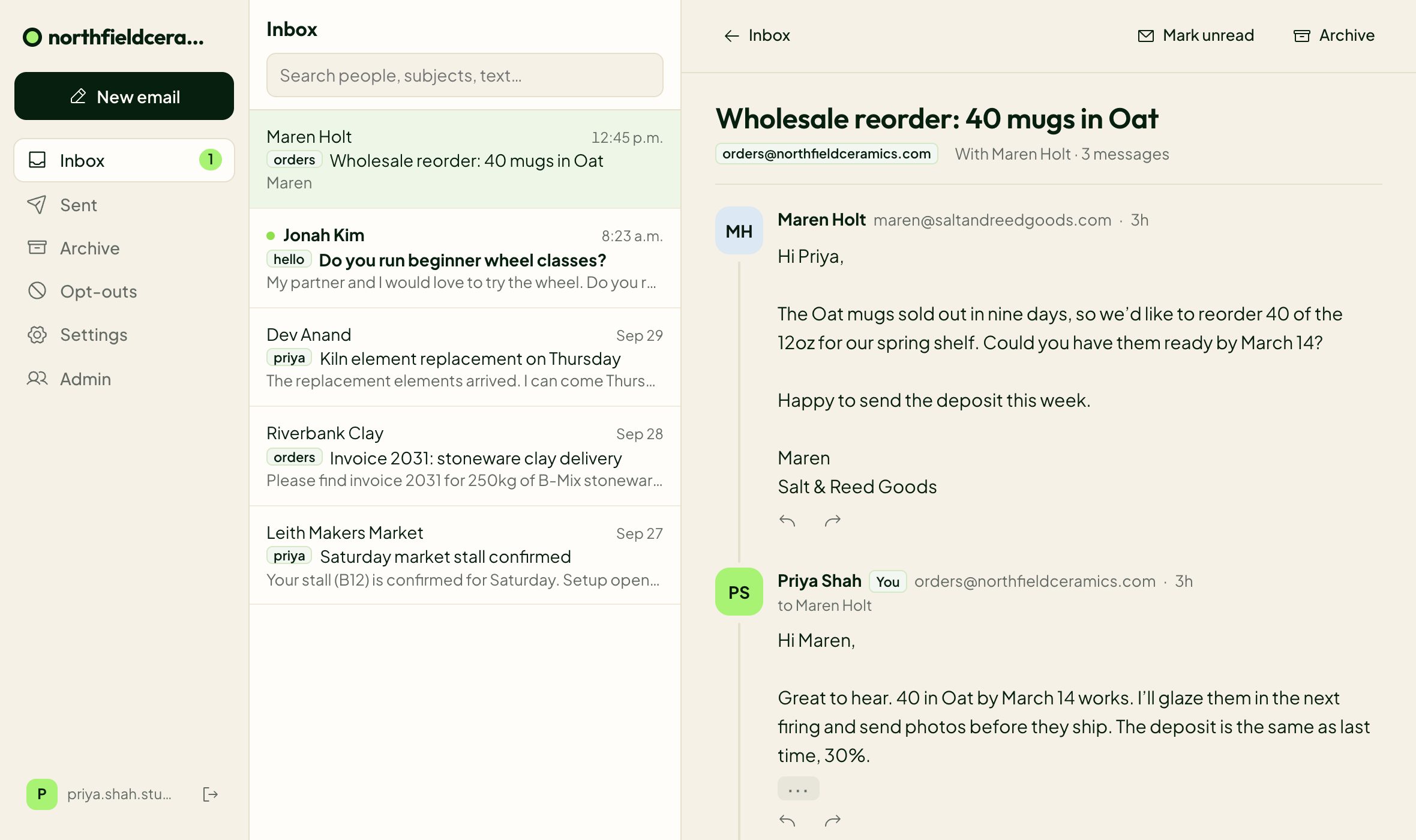
Email for every domain in your Cloudflare account
Most people with a Cloudflare account have more than one domain in it. Connect each one and it gets its own inbox, with its own addresses, labels, logo and sign-in page. You switch between projects from the top of the inbox with one login, so mail for your SaaS never mixes with mail for your newsletter.
The domains share the account's Workers Paid plan, so a new project adds an inbox without adding a bill.
Set up Cloudflare email in four steps
Check your domain
Enter it on Digismak. We read its DNS and current email setup, and change nothing until you confirm.
Connect Cloudflare
Digismak opens Cloudflare’s token page with the five permissions already filled in. Limit the token to that one domain, create it and paste it in.
Let setup run
Digismak turns on Email Routing, adds the MX and SPF records, turns on Email Sending with DKIM, and sends a test email through the whole path. Most of the time is Cloudflare verifying the domain, usually a few minutes, and you don’t have to stay on the page for it.
Pick your addresses
Choose your own address and add shared ones like support@ or hello@. You sign in with a code sent to the email you already use. A cofounder or contractor can be added the same way later.
Cloudflare email pricing, explained
Email Routing is free on every Cloudflare plan, and receiving is unlimited. Sending needs Cloudflare's Workers Paid plan: $5 a month per account, with 3,000 sent emails included and $0.35 for each 1,000 after that. You pay Cloudflare directly, and the plan covers every address on every domain in the account. If you already pay for Workers Paid, sending costs you nothing more.
Digismak itself is free while in early access. So the total is $5 a month whether it's just you or you and a few collaborators, where a per-person plan charges for every seat:
| People | Google Workspace Business Starter | Microsoft 365 Business Basic | Digismak |
|---|---|---|---|
| Just you | $7 | $7 | $5 |
| 2 people | $14 | $14 | $5 |
| 3 people | $21 | $21 | $5 |
| 5 people | $35 | $35 | $5 |
If your Cloudflare account is on Workers Free, Digismak still sets up receiving. Sending switches on once you upgrade, with no second setup.
Deliverability: SPF, DKIM and DMARC are set up for you
Mail from a new domain only reaches inboxes when the receiving server can check it. Setup adds an SPF record for Cloudflare, turns on DKIM signing for your domain, and, if your domain has no DMARC record yet, adds one in monitoring mode so nothing else that sends as your domain gets blocked. That matters if your app already sends receipts or password resets from the same domain. The last setup step sends a real email through the whole path and checks it arrives signed.
Want to see what your domain has today? Our free SPF, DKIM and DMARC checker reads your records and explains each one.
Questions
Is Cloudflare Email Routing free?
Yes. Email Routing is free on every Cloudflare plan, including the free one, and receiving is unlimited. It forwards mail to an address you already have; it doesn’t give you a mailbox.
How much does Cloudflare email sending cost?
Sending needs Cloudflare's Workers Paid plan, $5 a month per account. It includes 3,000 sent emails a month, then $0.35 per 1,000. Digismak uses this plan on your account and adds nothing on top during early access.
Can I use it for several domains?
Yes. Connect each domain and it gets its own inbox, addresses and sign-in page. You switch between them from the top of the inbox, and domains in the same Cloudflare account share one Workers Paid plan.
Can I use Cloudflare Email Routing with a custom domain for free?
Yes, as long as the domain’s DNS is on Cloudflare. Moving DNS to Cloudflare is free. Email Routing then receives mail for any address on the domain and forwards it where you choose.
What MX records does Cloudflare Email Routing use?
Turning on Email Routing adds three MX records pointing to route1.mx.cloudflare.net, route2.mx.cloudflare.net and route3.mx.cloudflare.net, plus an SPF record. Digismak adds them for you during setup.
Can I send email from my domain with Cloudflare?
Cloudflare Email Sending can, through its API or SMTP, but it has no inbox or compose screen. Digismak gives you that screen: you write and reply in the browser, and it sends through Email Sending on your account.
Will my existing Email Routing rules keep working?
Yes. Digismak adds a catch-all rule for addresses nothing else covers. Rules you already have, like forwarding invoices@ to your accountant, still apply first.
Does it work on the Cloudflare free plan?
Receiving does. Sending needs Workers Paid. Digismak detects your plan during setup, turns on receiving right away, and adds sending when you upgrade.
What happens if I stop using Digismak?
Delete the API token on Cloudflare and remove the relay Worker and the catch-all rule. New mail then follows your own routing rules again, and Digismak can no longer change anything in your account.