

Zoho Mail pricing plans, per user per month
Zoho Mail's email plans cost $1 to $4 per user a month, billed yearly. The Workplace plans, which add office apps and WorkDrive file storage, cost $3 to $6 billed yearly, or $4 to $7 billed monthly. A free plan covers up to 5 users, in some regions only.
| Plan | Billed yearly | Billed monthly | Mail storage per user |
|---|---|---|---|
| Forever Free (up to 5 users) | $0 | $0 | 5 GB |
| Mail Lite (5 GB) | $1 | Yearly only | 5 GB |
| Mail Lite (10 GB) | $1.25 | Yearly only | 10 GB |
| Mail Premium | $4 | Yearly only | 50 GB |
| Workplace Standard | $3 | $4 | 30 GB mail |
| Workplace Professional | $6 | $7 | 100 GB mail |
Two details change what you pay. Mail Lite and Mail Premium can only be paid yearly, so one person on Mail Lite (5 GB) pays $12 up front, and three people pay $36. Only the Workplace plans can be paid month to month, at the higher monthly rate. There's also an Enterprise tier of Workplace, priced through Zoho's sales team. Zoho offers a 15-day free trial of its top edition, no card needed.
Zoho Mail's free plan and custom domains
Zoho's Forever Free plan gives up to 5 users email on one custom domain, with 5 GB each. It's web and Zoho app only: no IMAP, POP or ActiveSync, so no Outlook or Apple Mail, and email forwarding is paid-only too. Once you add a sixth person, every user moves to a paid plan.
Zoho says the free plan is available only in some regions and doesn't list which ones, so check the pricing page from where you are. If you can get it, and webmail on one domain is enough, it costs less than anything else on this page. Digismak can receive mail on Cloudflare's free plan too, but sending from your domain needs Cloudflare's $5 a month Workers Paid plan.
Zoho Mail vs Digismak: what one to five people pay
Zoho charges for every person. Digismak runs on one Cloudflare plan, $5 a month per account, paid to Cloudflare. That plan covers every address on every domain in the account, and Digismak itself is free during early access.
| People | Zoho Mail Lite (5 GB) | Zoho Mail Premium | Digismak |
|---|---|---|---|
| Just you | $1 a month ($12 a year) | $4 a month ($48 a year) | $5 a month ($60 a year) |
| 2 people | $2 a month ($24 a year) | $8 a month ($96 a year) | $5 a month ($60 a year) |
| 3 people | $3 a month ($36 a year) | $12 a month ($144 a year) | $5 a month ($60 a year) |
| 5 people | $5 a month ($60 a year) | $20 a month ($240 a year) | $5 a month ($60 a year) |
On your own, Zoho is cheaper. One person on Mail Lite (5 GB) pays $1 a month, against $5 for Cloudflare's plan. Three people pay $3, and five pay $5, the same as Digismak. Digismak only costs less than Mail Lite from six people. Against Mail Premium, it costs less from two.
What changes that sum is whether you already pay for Workers Paid. Cloudflare sells the plan per account, so if yours has it, say for an app that runs on Workers, sending from Digismak costs nothing more. A second or third project in the same account doesn't add to it either.
One thing to watch on the Digismak side: Cloudflare's plan includes 3,000 sent emails a month, then charges $0.35 per 1,000. A month with 6,000 sent emails costs $6.05. Receiving is unlimited. To compare more low-cost options, see cheap business email.
How Digismak works as a Zoho Mail alternative
There's no per-person charge because sending and receiving run on your own Cloudflare account, and Cloudflare prices its plan per account. Cloudflare Email Routing receives mail for your domain, and a small relay Worker in your account passes it to the Digismak inbox. Replies go out through Cloudflare Email Sending, signed for your domain. Read how the pieces fit on Cloudflare email hosting.
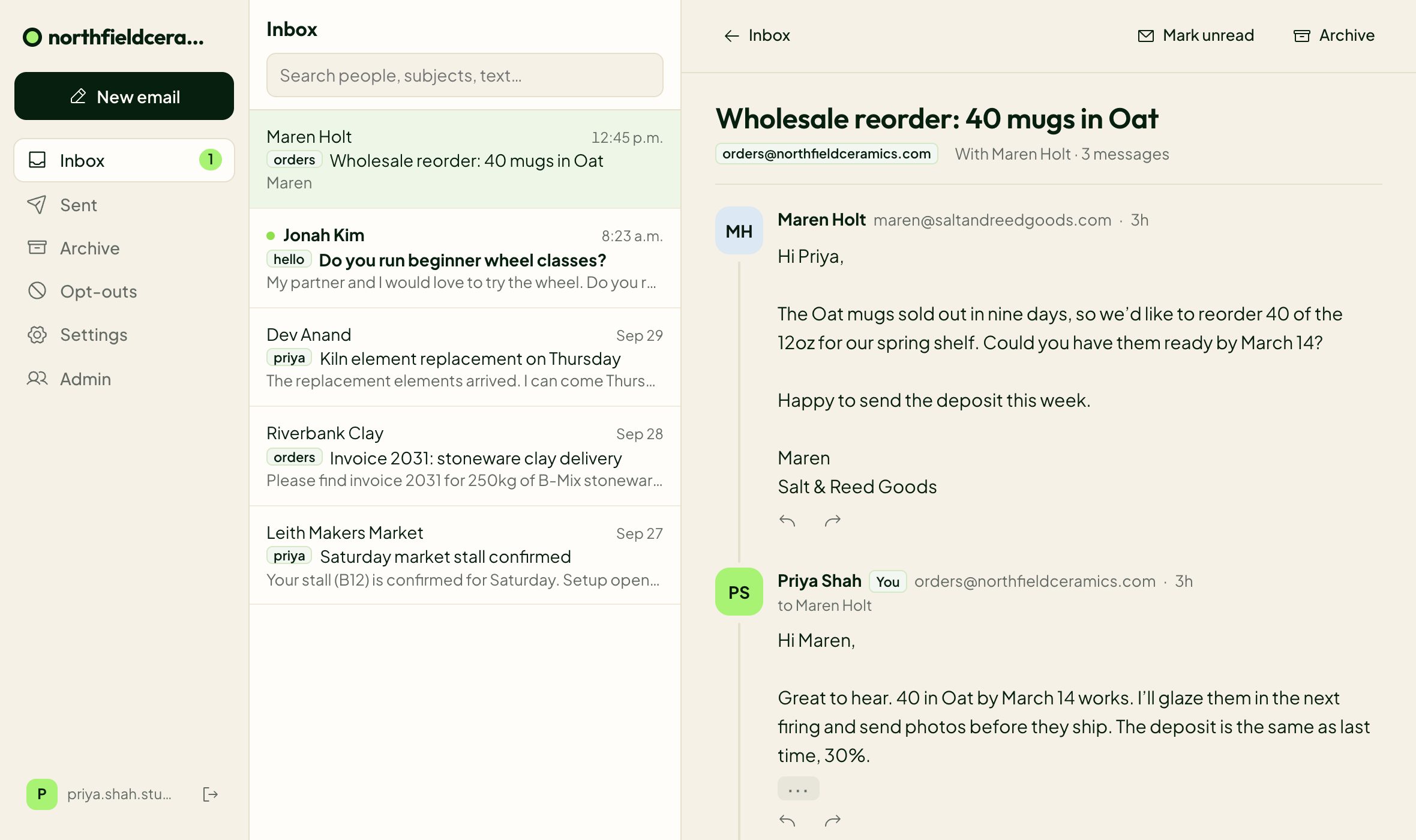
The inbox groups mail into conversations, with reply, reply all and forward. You see a live preview of what you're sending, and an admin can keep images from senders blocked until someone allows them. It works on phones in the browser.
If you run more than one project, connect each domain and it gets its own inbox, with its own addresses, labels and sign-in page. One login covers them all, and you switch between projects from the top of the inbox.
You sign in with a 6-digit code sent to the email you already use, so there's no password to reset. Shared addresses like support@ and hello@ are free. If a cofounder or a contractor joins later, they get their own address and can read and answer the shared ones too. Here's more on how shared inboxes work.
Features side by side
Zoho gives you the classic mailbox, with set storage per person, larger attachments and access from desktop and phone mail apps. Digismak is narrower: an inbox in the browser for each project.
| Zoho Mail (paid plans) | Digismak | |
|---|---|---|
| How you pay | Per user; Mail Lite and Mail Premium yearly only | One Cloudflare plan per account, $5 a month, for every domain in it |
| Mail storage per person | 5 GB or 10 GB on Lite, 50 GB on Premium | No quota published yet |
| Outlook, Apple Mail, Thunderbird | Yes, through IMAP, POP or ActiveSync | No. Browser only |
| On your phone | Zoho Mail app for iOS and Android | The inbox in your phone’s browser |
| Attachments per email | 30 MB on Lite, 40 MB on Premium | 3.5 MB outgoing |
| Recipients per email | 150 | 50 |
| Sending limit | 50 to 500 external emails an hour, set by sender reputation | Up to 200 people per person a day; 3,000 emails a month included, then $0.35 per 1,000 |
| Office apps and file storage | In the Workplace plans | None |
| Domains | 1 on the free plan, up to 30 on paid plans | An inbox per domain, one login; DNS must be on Cloudflare |
| Sending and receiving run on | Zoho’s servers | Your own Cloudflare account |
The Cloudflare requirement, and switching from Zoho
Digismak only works for domains whose DNS is on Cloudflare. Moving DNS there is free, but it's a real step. If your domain sits with another DNS host and you'd rather leave it there, Zoho is the easier choice. If you do switch, it goes like this:
Put your domain on Cloudflare
If it isn’t there yet, add it to Cloudflare for free and point your nameservers at Cloudflare. Check that your existing records, including Zoho’s mail records, came across before you switch.
Check your domain on Digismak
Setup reads your DNS, tells you your mail currently goes to Zoho, and changes nothing until you confirm.
Connect Cloudflare
Digismak opens Cloudflare’s token page with the permissions already filled in. Limit the token to that one domain, create it and paste it in. Digismak turns on Email Routing, adds the MX and SPF records and turns on Email Sending with DKIM. It adds DMARC if you have none, then sends a test email through the whole path.
Pick your addresses
Choose your own address and add shared ones like support@ or hello@. You sign in with a code sent to the email you already use. A cofounder or contractor can be added the same way later.
Digismak doesn’t import old mail yet. Your old messages stay in your Zoho account, so keep it until you’ve saved what you need.
Which should you pick?
Pick Zoho Mail if
- You don't already pay for Workers Paid, there are five of you or fewer, and 5 GB each is enough. Mail Lite (5 GB) then costs the same as Cloudflare's plan or less.
- You want your mail in Outlook, Apple Mail, Thunderbird or a phone mail app.
- You need big mailboxes (50 GB on Mail Premium) or attachments over 3.5 MB.
- You want documents and file storage from the same company, on a Workplace plan.
- Your domain isn't on Cloudflare and you'd rather not move it.
Pick Digismak if
- Your Cloudflare account already has Workers Paid, so sending costs nothing more.
- You run several projects on Cloudflare and want each one's mail in its own inbox, under one login.
- You answer support@ or hello@ yourself today and expect a cofounder or contractor to help later. Shared addresses are free.
- You're fine reading mail in a browser, on a laptop or a phone.
- You want the mail records, DKIM signing and DMARC set up for you, plus a test email before you go live.
- You want sending and receiving in your own Cloudflare account, through a token you can delete any time.
Questions
How much is Zoho Mail per user per month?
As of September 2026, Mail Lite (5 GB) is $1 per user a month, Mail Lite (10 GB) $1.25 and Mail Premium $4, all billed yearly. Workplace Standard is $3 yearly or $4 monthly, and Workplace Professional $6 or $7.
Is Zoho Mail free with a custom domain?
Zoho's Forever Free plan covers up to 5 users on one custom domain with 5 GB each, in the browser and Zoho's app only. Zoho says it's available only in some regions. From the sixth user, everyone moves to a paid plan.
Can I pay for Zoho Mail monthly?
Not for Mail Lite or Mail Premium, which are yearly only. The Workplace plans can be paid monthly: $4 per user for Workplace Standard and $7 for Workplace Professional.
Is Zoho Mail cheaper than Digismak?
For one person, yes, unless your Cloudflare account already has Workers Paid. Mail Lite (5 GB) is $1 per user a month against $5 a month for Cloudflare’s plan, and the two cost the same at five people. From six people Digismak costs less, and against Mail Premium it costs less from two.
Can I use Zoho Mail for more than one domain?
Zoho’s free plan covers one domain, and its paid plans up to 30, priced per user. In Digismak, each domain you connect gets its own inbox under one login, and domains in the same Cloudflare account share one Workers Paid plan.
What are Zoho Mail’s sending limits?
Zoho allows 50 to 500 external emails an hour, set by sender reputation. Paid plans allow up to 150 recipients per email, and the free plan 100. Bulk sending isn’t allowed. Digismak allows up to 50 recipients per email and 200 people per person a day.
Does Digismak work with Outlook or Apple Mail like Zoho does?
No. Digismak has no IMAP, POP or SMTP access, so it doesn’t connect to desktop or phone mail apps. It’s an inbox in the browser, and it works in phone browsers too. Zoho’s paid plans include IMAP, POP and ActiveSync.
What’s a good Zoho Mail alternative for side projects?
If your domains are on Cloudflare and you want an inbox for each project under one login, Digismak. If you want low-cost mailboxes that work in desktop and phone mail apps, compare Purelymail and Migadu. Both charge per account instead of per user.
Can I move from Zoho Mail to Digismak without losing mail?
New mail, yes: setup tells you your domain gets mail through Zoho and waits for you to confirm before switching. Old mail doesn’t move, because Digismak can’t import it yet, so keep your Zoho account until you’ve saved what you need.