

Why use your own domain for email
An address on your own domain tells people who you are before they open the message. A reply to a bug report from support@yourproject.com looks like it came from the product. The same reply from a personal Gmail address leaves the user wondering who they’re talking to.
It also stays yours. You own the domain, so you can change email providers later without changing a single address on your site, in your docs or in your app. And hello@, support@ and billing@ all sit under the name your users already know.
If you run several projects, each one gets addresses under its own name, instead of every reply going out from the same personal account.
Four ways to get email on your own domain
They differ in whether you can send as your domain, whether someone else can share an address with you, and whether you pay per person.
| Option | What you get | Catch | Cost |
|---|---|---|---|
| Forwarding only | Mail for your domain lands in an inbox you already have | Replies come from your personal address | Free with Cloudflare Email Routing |
| Gmail with a custom domain | Forwarding into Gmail, plus “Send mail as” your domain | You set up an outgoing mail server for each domain; shared addresses are messy | Free Gmail, plus a sending service |
| Google Workspace or Microsoft 365 | A mailbox per person, plus office apps and storage | You pay for every person you add | From $7 per person a month |
| Digismak | An inbox per domain with shared addresses, on your own Cloudflare account | Browser only, no office apps; your domain must be on Cloudflare | $5 a month per Cloudflare account, paid to Cloudflare |
If you need Google Docs or Microsoft Word as well, a suite is the right buy. If you only need email, you’re paying $7 a month per person on Google’s entry plan, or $7 on Microsoft’s, for apps you won’t open.
Gmail with a custom domain: how it works, and where it strains
Plenty of people start here, because they already live in Gmail. Setting it up takes two halves. First, forward your domain’s mail into Gmail; Cloudflare Email Routing does this for free. Second, add your address in Gmail under Settings, Accounts, “Send mail as”, which asks for an outgoing mail server for your domain, with its own username and password.
For one project it works. With several it strains. You repeat the outgoing server setup for each domain, and mail for every project lands in one personal inbox. Once a cofounder or a contractor helps with support@, the address has to be forwarded to both of you, so each gets a copy and neither can see who already answered. Replies can reveal the personal Gmail address behind the project one if a setting is missed.
A custom Gmail domain proper, meaning Gmail itself running on your domain, is Google Workspace, at $7 per person a month on a yearly plan. Digismak gives you an inbox for each project and shared addresses that anyone you add can answer, without the per-person price. It runs in the browser instead of the Gmail app, so if you want your project mail inside Gmail itself, Workspace or forwarding is the better fit.
Free domain email: what’s actually free
Receiving is the easy part. Cloudflare Email Routing forwards mail for any address on your domain at no cost, and Digismak can put that mail in a proper inbox on Cloudflare’s free plan too. Digismak itself is free while in early access.
Sending is where free runs out. To reply from your own domain, Digismak uses Cloudflare Email Sending, which needs Cloudflare’s Workers Paid plan at $5 a month per account. That one plan covers every address on every domain in the account and includes 3,000 sent emails a month. If you already pay for Workers Paid to run a project, sending costs you nothing more.
Some providers advertise free custom domain email with a catch in the fine print: web access only, a cap on users, or no sending from your domain. Check what happens when you reply before you move a project’s mail.
How to create email with your own domain
Here is the whole setup with Digismak. It takes a few minutes, most of it waiting for Cloudflare to verify the domain.
Have your domain on Cloudflare
If your project’s DNS is already on Cloudflare, skip this step. If it’s elsewhere, add the domain to Cloudflare for free and switch its nameservers. Cloudflare copies your existing DNS records, so your site keeps working.
Check your domain on Digismak
We read its DNS and current email setup. If it already gets mail through Google, Microsoft or another provider, we tell you and wait for you to confirm the switch.
Connect Cloudflare
Digismak opens Cloudflare’s token page with the permissions already filled in. Limit the token to that one domain, create it and paste it in. Digismak adds the mail records and turns on sending, signed for your domain.
Create your addresses
Pick your own address and add shared ones like hello@ and support@. You sign in with a code sent to the email you already use, so there’s no password. A cofounder or a contractor can be added later, by the email they already use.
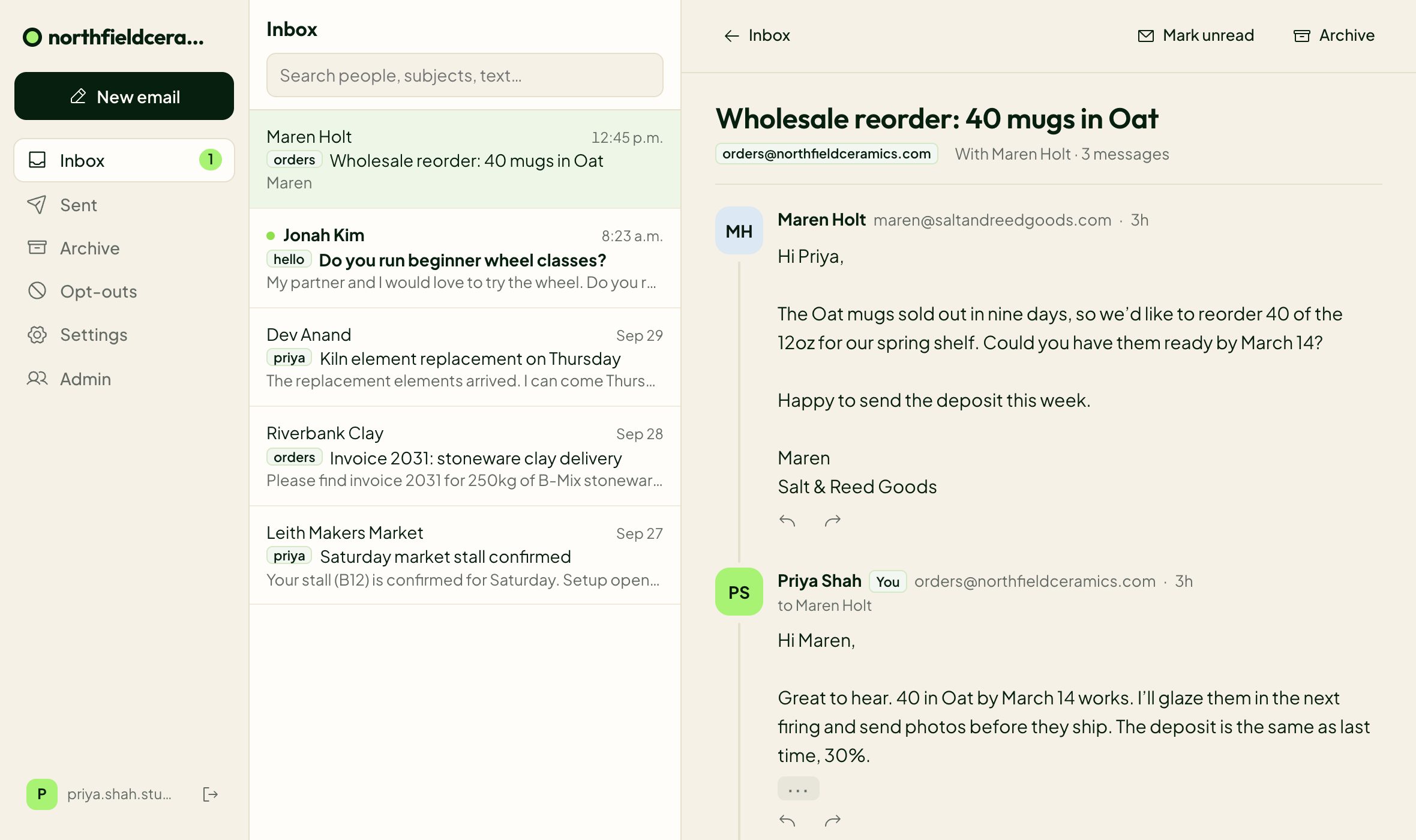
Custom domain email for more than one project
Connect each domain and it gets its own inbox, with its own addresses, labels and sign-in page. One login covers all of them, and you switch between projects from the top of the inbox.
Domains in the same Cloudflare account share one Workers Paid plan, so the next project you launch gets hello@ and support@ without a new bill.
What custom domain email costs, for one person or five
A per-person plan charges for you, then again for each person you add. Digismak runs on one Cloudflare plan for the whole account, and Digismak itself is free during early access. Google and Microsoft prices below are entry plans on yearly billing, as of September 2026:
| People | Google Workspace Business Starter | Microsoft 365 Business Basic | Digismak |
|---|---|---|---|
| Just you | $7 | $7 | $5 |
| 2 people | $14 | $14 | $5 |
| 3 people | $21 | $21 | $5 |
| 5 people | $35 | $35 | $5 |
See how the numbers compare in detail on our cheap business email page, or read how the Cloudflare side works on Cloudflare email hosting.
Questions
Can I use Gmail with a custom domain?
Yes, two ways. Forward your domain’s mail to Gmail (Cloudflare Email Routing does this free) and add your address under Gmail’s “Send mail as”, which needs an outgoing mail server for your domain. Or pay for Google Workspace, which puts Gmail on your domain from $7 per person a month.
Is there free email with your own domain?
Receiving can be free: Cloudflare Email Routing forwards it, and Digismak can put it in an inbox on Cloudflare’s free plan. Sending from your domain needs Cloudflare’s $5 a month Workers Paid plan, which covers every domain in that Cloudflare account.
How do I create an email address with my own domain?
Move the domain’s DNS to Cloudflare, connect it to Digismak with an API token, and pick your address. Setup adds the MX, SPF, DKIM and DMARC records for you.
Can I use custom domain email for several projects?
Yes. Connect each domain and it gets its own inbox, addresses and sign-in page. You switch between them with one login, and domains in the same Cloudflare account share one Workers Paid plan.
Will my website break if I move DNS to Cloudflare?
It shouldn’t. When you add a domain, Cloudflare scans and copies your existing DNS records. Check that your website’s records are listed before you switch the nameservers.
Can more than one person share an address like support@?
Yes. In Digismak, shared addresses are free and everyone on the domain can read and answer them. See shared inboxes.
Can I keep my current email while I set this up?
Setup reads your current mail records first and changes nothing until you confirm. If your domain already uses Google or Microsoft for mail, it waits for you to agree to the switch.
Do extra addresses cost more?
No. Digismak doesn’t charge per address. Add a person or a shared address and the price stays the same.