

What is a shared inbox?
A shared inbox is one email address, like support@yourproject.com, that more than one person can read and answer. Users write to the address rather than to a person, and the answer comes back from the same address, whoever sent it.
It fixes two ordinary problems. Mail to hello@ doesn’t wait in one person’s inbox while they’re away. And two people don’t both answer the same user, because the reply that already went out sits in the conversation for both to see.
It’s worth having even if you work alone. Publish support@ instead of your own name, and a cofounder or a contractor can start answering it later without your users changing anything.
Common ones are support@, billing@ and hello@. What they cost you depends on where your email lives.
Why forwarding support@ to everyone falls short
The free way to share an address is forwarding: send mail for support@ to each person’s own inbox. Every copy then lands in a separate inbox, so you can’t see whether your cofounder already replied. Your reply goes out from your own address, so the user’s next message skips support@ entirely. And with Cloudflare Email Routing, each rule forwards to one destination; sending one address to several people needs a Worker.
A shared inbox keeps one copy of the conversation that everyone reads, and the replies go out from the shared address.
Shared inbox in Google Workspace: a seat or a workaround
Google Workspace has three ways to let several people handle an address like support@. The one Google calls a shared inbox costs a license in practice. The two free ones are an email alias and a Google Group.
| Option | Who can read and answer | Cost | Good to know |
|---|---|---|---|
| Shared inbox (a delegated account) | The people the account is delegated to | A license at your plan’s price: $7 a month on Business Starter | Google’s admin tool for creating shared inboxes is still being released in phases |
| Email alias | One person | Free, up to 30 per user | Only one user receives the mail sent to an alias |
| Google Group as a Collaborative Inbox | Members of the group | Free, uses no license | It’s a group, not a mailbox. Google suggests it for support and customer service addresses |
The license point is our reading of Google’s rules, not a line Google prints. In Gmail, Google says “delegated accounts and shared inboxes are the same”. That makes a shared inbox a Google account that other people are given access to. Google also says a user needs a license to use a Google service, and that users can’t share one. On Business Starter, that makes a real support@ inbox $7 a month, or $84 a year, for each shared address. Our Google Workspace pricing page has the other plans.
If you’re the only person on the account, the alias is enough: you’re the one user who receives its mail.
Microsoft 365 handles this differently. A shared mailbox needs no license of its own up to 50 GB. Up to 25 people can use one, but each of them needs their own licensed mailbox. If you’re weighing the two suites, our Microsoft 365 alternative page covers the rest of the price.
Shared inbox software charges per seat on top of your email
The other route is dedicated shared inbox software, such as Front or Missive. These tools charge per seat on top of email. If your email is on Google Workspace or Microsoft 365, each person who answers support@ then needs two subscriptions: an email license and a seat in the tool.
Digismak doesn’t assign conversations to people, track response times or keep internal notes. If support has grown to the point where you need those, a help desk tool is the better fit. If what you need is one address that you and a couple of other people can read and answer from, you don’t need a second subscription for it.
How shared addresses work in Digismak
In Digismak, a shared address sits in the same inbox as your personal mail, and it costs nothing extra.
Add the address
Type support@, hello@ or billing@ in the admin console. There’s no seat to buy and no mailbox to license.
Everyone on the domain sees it
Mail to the shared address lands in your inbox next to your own mail, labeled with the address it came to. Anyone you add to the domain sees it the same way.
Anyone can answer
A reply always goes out from the address the user wrote to, as “Name (support@)”, so they know who answered.
The conversation stays together
The reply sits in the same conversation, so the next person to open it sees what was said.
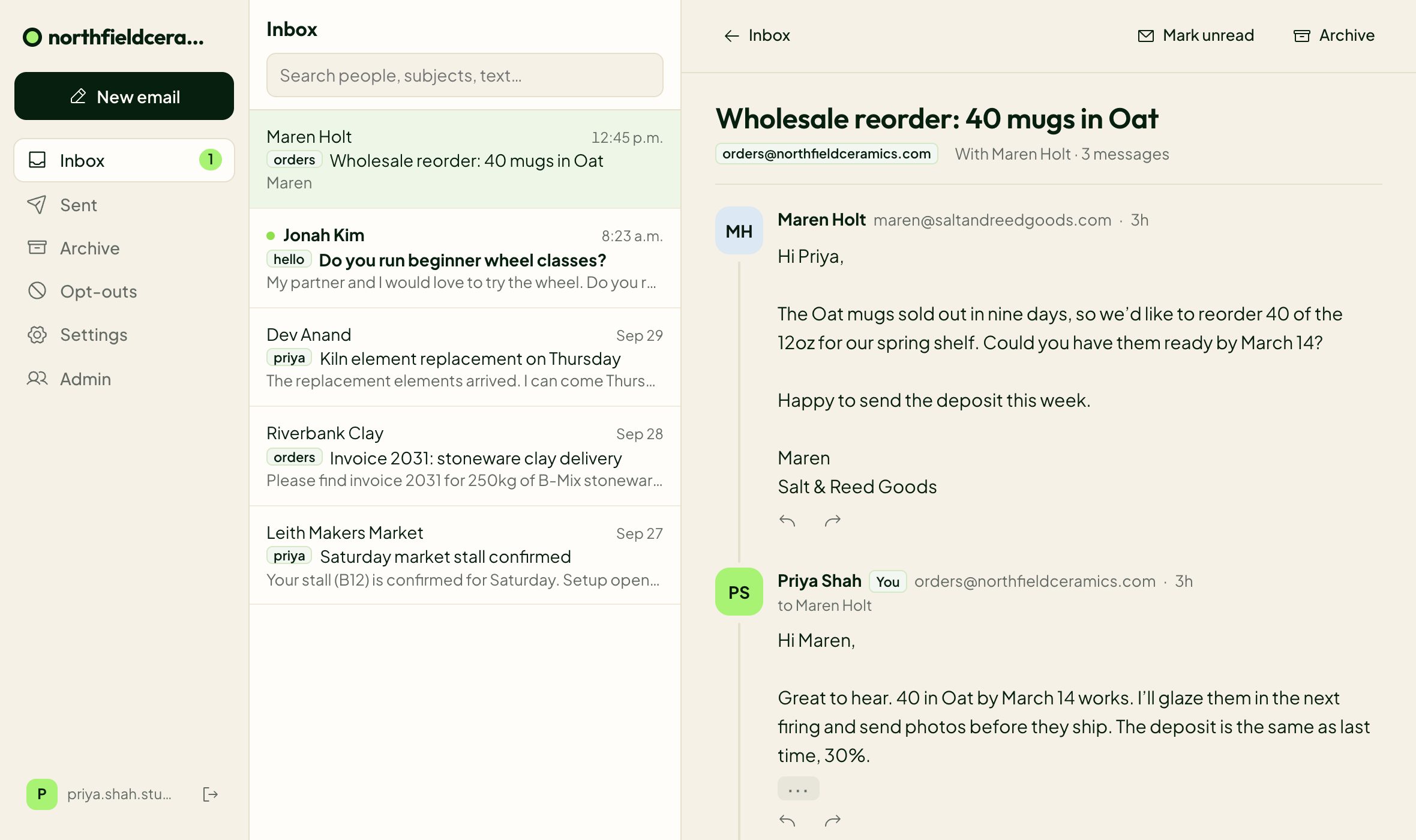
Anyone can also start a new email from a shared address by picking it in the From menu. Admins remove shared addresses from the same console, and adding or removing one never changes the price.
Two limits to know. Every shared address is open to everyone on the domain, so you can’t restrict one to a few people. And it’s a browser inbox with no IMAP, POP or SMTP access. Outlook, Apple Mail and Thunderbird can’t connect, but it works on phones in the browser.
Behind the inbox is your own Cloudflare account: Cloudflare Email Routing receives the mail and Cloudflare Email Sending sends the replies. Here’s how the Cloudflare side works.
A shared inbox for each project
Shared addresses belong to a domain, so each project you connect has its own. Mail to support@ for your SaaS and support@ for your newsletter lands in two separate inboxes, and you switch between them from the top of the inbox with one login.
Domains in the same Cloudflare account share one Workers Paid plan, so support@ on a new project costs nothing more.
What a shared inbox costs: Google plus a tool vs Digismak
Say 3 of you answer support@: you, a cofounder and a contractor. Here’s the monthly bill for each setup, at yearly prices as of September 2026:
| Setup | Monthly cost for 3 people | What’s included |
|---|---|---|
| Google Workspace Business Starter, support@ as a Collaborative Inbox | $21 | Gmail and the Google apps for everyone; support@ is a Google Group |
| Google Workspace Business Starter, support@ as its own account | $28 | A delegated shared inbox, at the price of one more license |
| Google Workspace Business Starter plus a shared inbox tool | $21, plus the tool’s price for 3 seats | Gmail for everyone, with the tool on top |
| Microsoft 365 Business Basic, support@ as a shared mailbox | $21 | Outlook and the Microsoft apps for everyone; the shared mailbox is free up to 50 GB |
| Digismak | $5, paid to Cloudflare | An inbox for everyone and free shared addresses; email only, no office apps |
Google and Microsoft include office apps in their price and Digismak doesn’t, so the gap only counts if email is all you need. Digismak itself is free during early access. The $5 is Cloudflare’s Workers Paid plan, which covers every address on every domain in your Cloudflare account and includes 3,000 sent emails a month, then $0.35 per 1,000.
Shared inbox best practices for small teams
A small team here means two to five people: you and a cofounder, or you and whoever helps with support.
- Give each job its own address: support@ for bugs and questions, billing@ for payments, hello@ for the rest. The label on each conversation then tells you what it’s about before you open it.
- Reply from the shared address, not your personal one, so the user’s next message comes back where everyone can see it. Digismak does this by default.
- Agree who checks each address and when. An address two people can answer can also go unanswered if each assumes the other has it.
- Put a name on every reply so the user knows who they’re talking to. Digismak does this for you: replies from a shared address go out as “Name (support@)”.
- Create every address you publish. In Digismak, mail to an address that doesn’t exist bounces, so if billing@ is on your pricing page, add it.
Questions
How do I set up a shared inbox in Google Workspace?
There are three ways. An admin can create a shared inbox, which is an ordinary account delegated to the people who answer it and in practice needs its own license. The free options are a Google Group used as a Collaborative Inbox, or an email alias. You get up to 30 aliases per user, but only one person receives each.
Can you have a shared inbox in Gmail?
With Google Workspace, yes. Google says that in Gmail “delegated accounts and shared inboxes are the same”: one account that other people are given access to. The free alternative is a Google Group used as a Collaborative Inbox.
What’s the difference between a collaborative inbox and a shared mailbox?
A Collaborative Inbox is a Google Group that members use to read and answer shared mail, and it’s free in Google Workspace. A shared mailbox is a mailbox of its own. In Microsoft 365 it needs no license up to 50 GB. In Google Workspace, the equivalent is a shared inbox: an ordinary account that in practice needs a license.
Does a shared inbox need its own license?
It depends where your email is. In Google Workspace, a shared inbox is a user account, so in practice it takes a license, while a Collaborative Inbox or an alias doesn’t. In Microsoft 365, a shared mailbox needs no license up to 50 GB. In Digismak, shared addresses are free.
How does a shared inbox for teams work in Digismak?
An admin adds an address like support@ in the admin console. Everyone on the domain then sees its mail in their inbox, labeled with the address, and anyone can reply. Replies go out as “Name (support@)”.
Can I see who replied from a shared address?
Yes. A reply from a shared address goes out as “Name (support@)”, so the user sees who answered. The reply also stays in the conversation for everyone else on the domain.
Can I use a shared address in Outlook or Apple Mail?
No. Digismak has no IMAP, POP or SMTP access, so desktop mail apps can’t connect. Shared and personal addresses live in the browser inbox, which also works on phones.
How much does a shared address cost in Digismak?
Nothing. Shared addresses are free, and Digismak itself is free during early access. Sending needs Cloudflare’s Workers Paid plan, $5 a month per Cloudflare account, paid to Cloudflare.